Safety 101 Pricing
$90 / month

Per 20 system users
No setup fees
Unlimited employees
Unlimited locations
Unlimited Employee Portal users
Includes all features
- Mobile inspection app
- Training tracker
- Employee portal
- Incident manager
- OSHA Recordkeeping
- Document manager
Book Your Personalized Demo
See what’s possible with Safety 101
Book Your Personalized Demo
Affordable safety management software for $90 per month
Safety 101 Pricing
$90 / month
Per 20 system users
No setup fees
Unlimited employees
Unlimited locations
Unlimited Employee Portal users
Includes all features
- Mobile inspection app
- Training tracker
- Employee portal
- Incident manager
- OSHA Recordkeeping
- Document manager
What to Expect From Your Safety 101 Demo
Our live demo offers a personalized walkthrough of Safety 101’s features, tailored to your needs.
What You’ll Learn
We’ll begin by discussing your safety program needs and identifying where you think your current processes may be falling short. From there, we’ll walk you through a customized demo of Safety 101—showing exactly how the platform fits your unique safety challenges and goals.
This Demo is For
- Safety Managers
- EHS Directors
- Operations Directors
- HR Supervisors
- Production Leaders
- Fleet Managers
- Construction Superintendents
- Safety Consultants
If you play a role in safety, this demo is for you.
How Long It Takes
Your personalized walkthrough takes about 15-30 minutes. We’ll focus on the tools and workflows most relevant to your environment and your safety situation. After the demo, you will clearly see how Safety 101 helps your team manage safety across all your locations.
What to Expect From Your Safety 101 Demo
Our live demo offers a personalized walkthrough of Safety 101’s features, tailored to your industry and specific challenges.
What You’ll Learn
We’ll begin by discussing your safety program needs and identifying where you think your current processes may be falling short. From there, we’ll walk you through a customized demo of Safety 101—showing exactly how the platform fits your unique safety challenges and goals.
This Demo is For
- Safety Managers
- EHS Directors
- Operations Directors
- HR Supervisors
- Production Leaders
- Fleet Managers
- Construction Superintendents
- Safety Consultants
If you play a role in safety, this demo is for you.
How Long It Takes
Your personalized walkthrough takes about 15-30 minutes. We’ll focus on the tools and workflows most relevant to your environment and your safety situation. After the demo, you will clearly see how Safety 101 helps your team manage safety across all your locations.
Software For Your Safety Program
- Mobile Inspection App - Schedule and perform paperless inspections
- Training Tracker - Keep employee training current
- Employee Portal - Provide your team an easy way to share ideas
- Incident Manager - Manage injuries, near misses, vehicle accidents, etc.
- OSHA Recordkeeping - Generate 301, 300, 300A and ITA reports
- Document Manager - Manage safety data sheets, operators manuals, etc.

Software For Your Safety Program
- Mobile Inspection App - Schedule and perform paperless inspections
- Training Tracker - Keep employee training current
- Employee Portal - Provide your team an easy way to share ideas
- Incident Manager - Manage injuries, near misses, vehicle accidents, etc.
- OSHA Recordkeeping - Generate 301, 300, 300A and ITA reports
- Document Manager - Manage safety data sheets, operators manuals, etc.
Safety 101 Video Overview
Safety 101 Features
Safety 101 Features
1. Mobile Inspection App
- Build your own custom checklists:
- Facility inspections
- Hazard Assessments (JSA’s / JHA’s)
- Toolbox talks (w/ attendee signatures)
- Confined space entry permits
- Hot work permits
- Schedule one-time or recurring inspections
- Document findings with notes and pictures
- Share inspection results and assign correctie actions
- Operate in off-line mode (no cell service)
- Mobile Inspection App available for Apple devices (iPhone and iPad) and Android devices (Samsung, Google, LG, Motorola etc…)
"We have been using Safety 101 for over a year now, and it has elevated our safety program to new heights. With the Inspection Tool, we can effortlessly review and monitor the completion of our Weekly, Monthly, and Quarterly Safety Audits."
1. Mobile Inspection App
- Build your own custom checklists:
- Facility inspections
- Hazard Assessments (JSA’s / JHA’s)
- Toolbox talks (w/ attendee signatures)
- Confined space entry permits
- Hot work permits
- Schedule one-time or recurring inspections
- Document findings with notes and pictures
- Share inspection results and assign correctie actions
- Operate in off-line mode (no cell service)
- Mobile Inspection App available for Apple devices (iPhone and iPad) and Android devices (Samsung, Google, LG, Motorola etc…)
"We have been using Safety 101 for over a year now, and it has elevated our safety program to new heights. With the Inspection Tool, we can effortlessly review and monitor the completion of our Weekly, Monthly, and Quarterly Safety Audits."
"Safety 101 has been instrumental in allowing us to close gaps in our safety and training profile. They provide an easy, adaptable, and straight forward platform. Our return on investment with Safety 101 is unquestionable."
2. Training Tracker
- Keep employee training current
- System generated training plan identifies training courses your employees will need over the next 90 days — it also provides a list of suggested attendees for each course
- Dashboard lists upcoming courses along with team members with training that has expired or is set to expire
- Schedule courses, sign up attendees, record attendance
- Option to have courses taken in your online training system automatically recorded in Safety 101
2. Training Tracker
- Keep employee training current
- System generated training plan identifies training courses your employees will need over the next 90 days — it also provides a list of suggested attendees for each course
- Dashboard lists upcoming courses along with team members with training that has expired or is set to expire
- Schedule courses, sign up attendees, record attendance
- Option to have courses taken in your online training system automatically recorded in Safety 101
"Safety 101 has been instrumental in allowing us to close gaps in our safety and training profile. They provide an easy, adaptable, and straight forward platform. Our return on investment with Safety 101 is unquestionable."
3. Employee Portal
- Provide your team an easy way to share ideas and report hazards – a key element of the OSHA Voluntary Protection Program
- Facilitate a “good-catch” reward and recognition program
- Option to provide employees access to upcoming training course schedule and selective documents such as safety data sheets
- Available in Spanish and English
"In 2022, we successfully switched all operations to Safety 101. Our EH&S Department has been able to track trends and provide detailed reports directly from the associates in the field with QR code portals. The field associate to the COO has found working with Safety 101 easy and stress-free."
3. Employee Portal
- Provide your team an easy way to share ideas and report hazards – a key element of the OSHA Voluntary Protection Program
- Facilitate a “good-catch” reward and recognition program
- Option to provide employees access to upcoming training course schedule and selective documents such as safety data sheets
- Available in Spanish and English
"In 2022, we successfully switched all operations to Safety 101. Our EH&S Department has been able to track trends and provide detailed reports directly from the associates in the field with QR code portals. The field associate to the COO has found working with Safety 101 easy and stress-free."
"Our company has partnered with Safetly 101 since 2019. We went from having our paperwork scattered throughout our facility to having everything contained within the Safety 101 program. Safety 101 is a cost effective solution to get your safety program organized.
You simply can’t go wrong by partnering with Safety 101."
4. Incident Manager
- Capture observed hazards, near misses, minor injuries, and serious injuries for all locations in one place
- You can also capture vehicle accidents, property damage and other incident types
- Promote consistent approach to incident investigations, root cause analysis and corrective action implementation
- Perform periodic audits to ensure once a corrective action is put in place, it stays in place
- Generate OSHA 300 Forms and download 300A CSV for electronic submittal to OSHA
4. Incident Manager
- Capture observed hazards, near misses, minor injuries, and serious injuries for all locations in one place
- You can also capture vehicle accidents, property damage and other incident types
- Promote consistent approach to incident investigations, root cause analysis and corrective action implementation
- Perform periodic audits to ensure once a corrective action is put in place, it stays in place
- Generate OSHA 300 Forms and download 300A CSV for electronic submittal to OSHA
"Our company has partnered with Safetly 101 since 2019. We went from having our paperwork scattered throughout our facility to having everything contained within the Safety 101 program. Safety 101 is a cost effective solution to get your safety program organized.
You simply can’t go wrong by partnering with Safety 101."
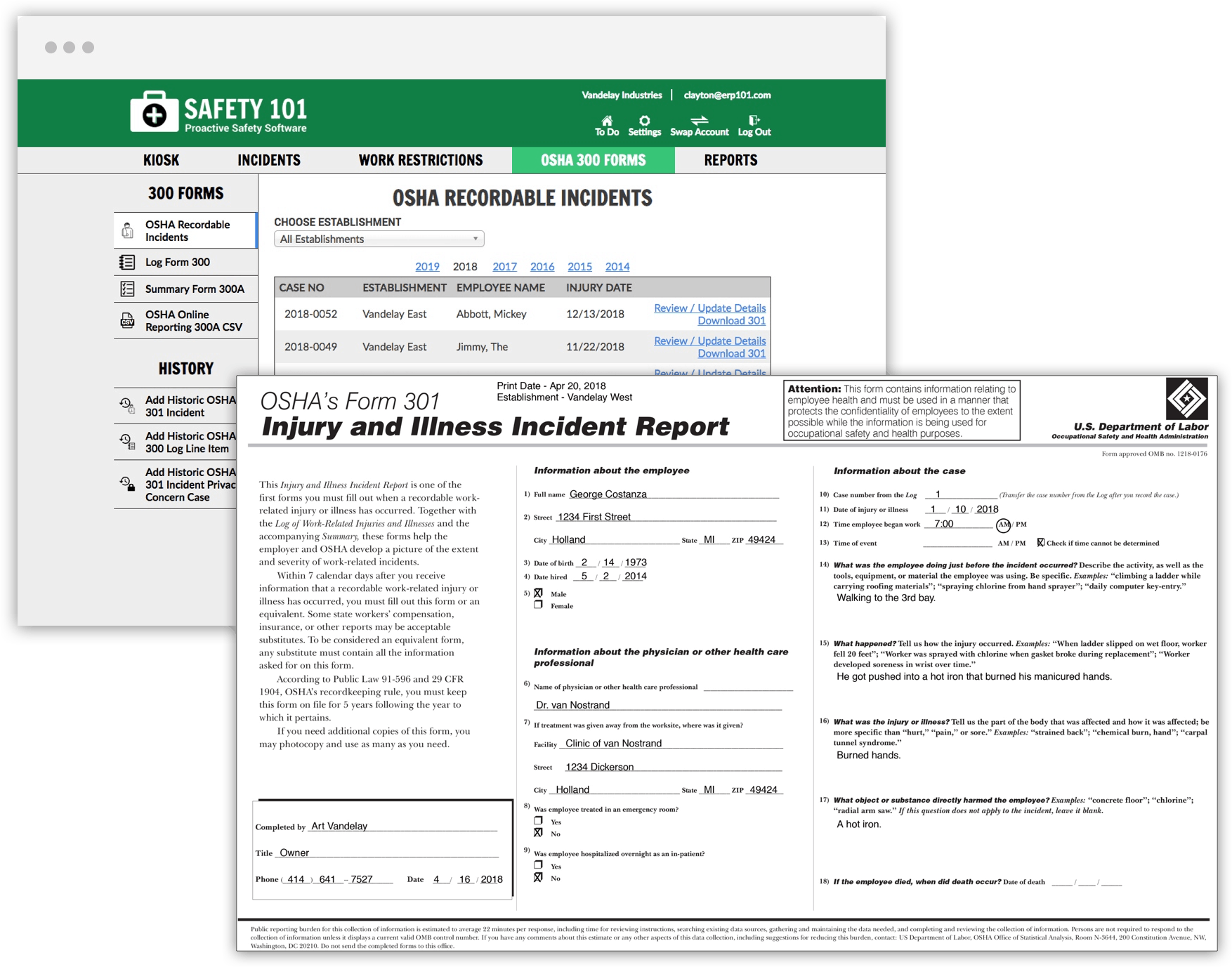
5. OSHA Recordkeeping
Generate your OSHA 300 Reports such as:
- 301 Injury and Illness Report
- 300 Log (All 300 Log Forms can be generated for all locations with one click)
- 300A Summary (All 300A Summary Forms can be generated for all locations with one click)
- Injury Tracking Application reports
“Having training records and safety documents organized and immediately accessible is key when OSHA asks for your documentation. Customizing training requirements, sharing selected documents with the employees via the portal, and updating our OSHA logs in real time make it much less stressful to keep up with OSHA compliance.”
5. OSHA Recordkeeping
Generate your OSHA 300 Reports such as:
- 301 Injury and Illness Report
- 300 Log (All 300 Log Forms can be generated for all locations with one click)
- 300A Summary (All 300A Summary Forms can be generated for all locations with one click)
- Injury Tracking Application reports
“Having training records and safety documents organized and immediately accessible is key when OSHA asks for your documentation. Customizing training requirements, sharing selected documents with the employees via the portal, and updating our OSHA logs in real time make it much less stressful to keep up with OSHA compliance.”
“We’ve been using Safety 101 for about 2 years now, and it has truly been a game-changer for our company. The ease of use is incredible—everything we need is right at our fingertips, thanks to the QR code feature. We’ve placed QR code stickers in all of our vehicles, giving our field workers instant access to essential tools, whether it’s reporting a near miss, recognizing a coworker’s efforts, accessing critical documents, or even reporting an issue with a vehicle. It’s all there, under one QR code!”
6. Document Manager
- Manage all your documents in one place such as:
- Safety plans
- Operating manuals
- Safety data sheets
- Lockout/tagout procedures
- Give employees access to safety data sheets via the Employee Portal
- Attach QR code to a piece of equipment to give team access to lockout/tagout procedures
- Schedule periodic document reviews
- Track document revision history
- Automatically notify document holders whenever a document is revised
6. Document Manager
- Manage all your documents in one place such as:
- Safety plans
- Operating manuals
- Safety data sheets
- Lockout/tagout procedures
- Give employees access to safety data sheets via the Employee Portal
- Attach QR code to a piece of equipment to give team access to lockout/tagout procedures
- Schedule periodic document reviews
- Track document revision history
- Automatically notify document holders whenever a document is revised
“We’ve been using Safety 101 for about 2 years now, and it has truly been a game-changer for our company. The ease of use is incredible—everything we need is right at our fingertips, thanks to the QR code feature. We’ve placed QR code stickers in all of our vehicles, giving our field workers instant access to essential tools, whether it’s reporting a near miss, recognizing a coworker’s efforts, accessing critical documents, or even reporting an issue with a vehicle. It’s all there, under one QR code!”

Bye-Bye Safety Spreadsheets…Hello Safety 101
Book Your Personalized Demo
Two Other Ways to Request a Safety 101 Webcast Demo

Chat Live With Us
M-F 8-5 PM EST

Two Other Ways to Request a Safety 101 Webcast Demo
Two Other Ways to Request a Safety 101 Webcast Demo
Chat Live With Us
M-F 8-5 PM EST
OR

Chat Live With Us
M-F 8-5 PM EST

(616) 228-9440
M-F 8-5 PM EST
Follow us on social media

Download Mobile Inspection App (Android)

Safety 101 provides content as a service to its readers and users. Safety 101 does not offer legal advice nor guarantee the accuracy or suitability of its content for a particular purpose.
Chat Live With Us
M-F 8-5 PM EST
(616) 228-9440
M-F 8-5 PM EST
Download Mobile Inspection App (Android)
Safety 101 provides content as a service to its readers and users. Safety 101 does not offer legal advice nor guarantee the accuracy or suitability of its content for a particular purpose.
Chat Live With Us
M-F 8-5 PM EST
(616) 228-9440
M-F 8-5 PM EST
Download Mobile Inspection App (Android)
Safety 101 provides content as a service to its readers and users. Safety 101 does not offer legal advice nor guarantee the accuracy or suitability of its content for a particular purpose.